

Cloud security posture management (CSPM) continuously scans cloud accounts for misconfigurations, ranks them by real-world risk, and hands security teams a prioritized fix list instead of a spreadsheet of alerts. It belongs in any environment running AWS, Azure, or GCP at scale, and it matters most for teams juggling multi-cloud sprawl or compliance deadlines they can't afford to miss. Skip it, and drift in IAM roles or storage permissions sits invisible until an attacker finds it first.
TL;DR:
- Continuous asset discovery and real-time policy checks against standards like CIS or NIST are essential for accurate, up-to-date cloud posture management.
- Risk scoring that considers exposure levels, identity access, and data sensitivity helps prioritize fixes and avoid alert fatigue.
- CSPM's effectiveness depends on proper integration with logging, automation, and workflow tools, requiring ongoing review of provider APIs and coverage gaps.
- Multi-cloud environments demand cross-provider correlation and IaC scanning to prevent blind spots and recurring misconfigurations.
- Regulated organizations benefit from ongoing operational processes and audit-ready documentation to ensure CSPM findings result in verified, compliant fixes.
Table of Contents
- What Is Cloud Security Posture Management and Why Does It Matter?
- What Capabilities Should You Expect From a CSPM Platform?
- How Does CSPM Work Under the Hood?
- How Do You Actually Deploy CSPM Step by Step?
- Do You Need CSPM or a Full CNAPP for Multi-Cloud?
- How Do You Connect CSPM Findings to SecOps and DevOps Workflows?
- What Are the Limitations and Common Pitfalls of CSPM?
- What Do Regulated Organizations Get Wrong About CSPM?
- How Marfi Helps You Operationalize CSPM at Scale
- Sources
What Is Cloud Security Posture Management and Why Does It Matter?
CSPM watches the control plane, not the workload. It checks how your IaaS, PaaS, and SaaS accounts are configured against a baseline of secure defaults, flagging the gap between what's set up and what should be. That distinction trips up a lot of teams new to the category: CSPM doesn't scan inside a running container or inspect network traffic. It asks a narrower, more urgent question: is this S3 bucket public? Does this IAM role have permissions it never needs? Is this security group open to 0.0.0.0/0?
Those questions matter because misconfiguration, not zero-day exploits, drives most cloud breaches. A single overly permissive role or an exposed database port can sit unnoticed for months in a sprawling multi-account setup. CSPM exists because manual audits can't keep pace with environments that change hundreds of times a day through Terraform runs, autoscaling, and ad hoc console changes. Microsoft frames CSPM as a proactive layer that identifies and remediates cloud misconfigurations before they turn into incidents, positioning it as a governance component inside the broader cloud native application protection platform (CNAPP) model rather than a standalone gadget.
The misconfigurations that recur most often across audits include:
- Storage buckets or blob containers left publicly readable or writable
- IAM roles and service accounts with wildcard or excessive permissions
- Security groups and network ACLs with open inbound rules on sensitive ports
- Unencrypted data stores or disabled logging on production resources
- Default credentials or unused accounts that never got deprovisioned
Each of these maps cleanly to a control in frameworks like CIS Benchmarks, NIST 800-53, or PCI DSS, which is why CSPM output doubles as a running compliance record, not just a security to-do list.
What Capabilities Should You Expect From a CSPM Platform?
A CSPM platform earns its budget line by doing five things well, and most buyers underweight at least one of them during evaluation.
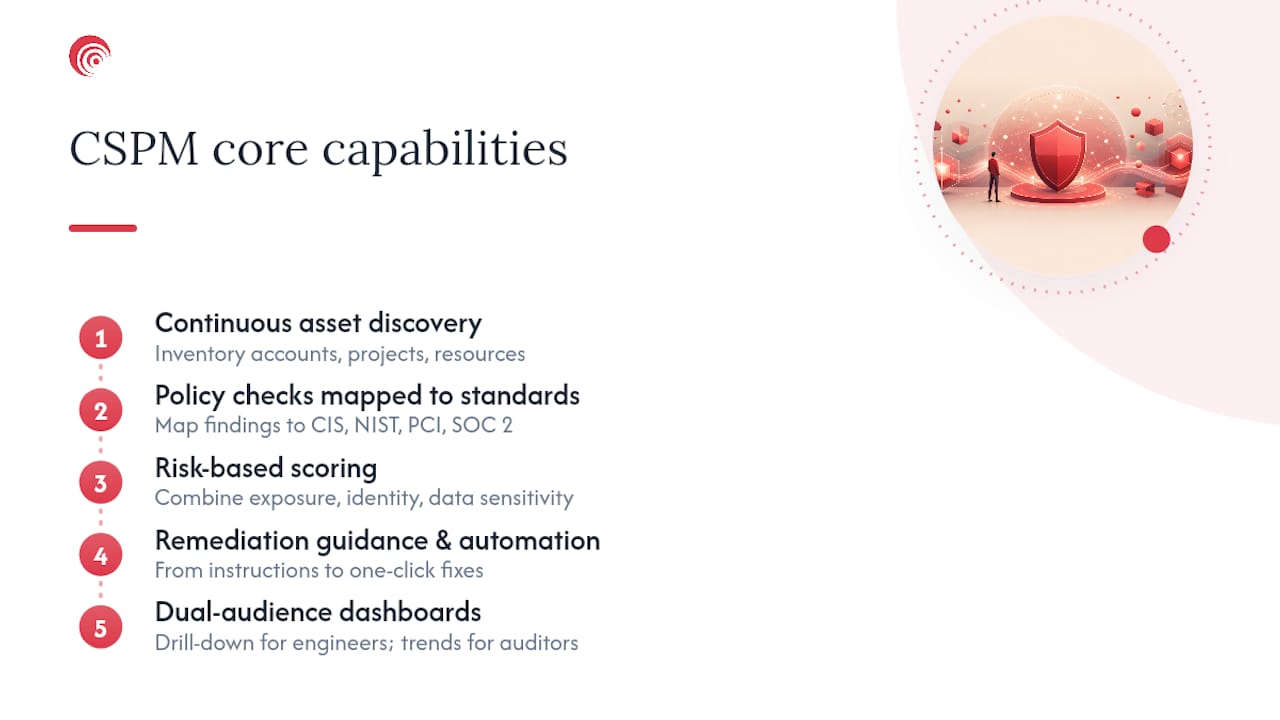
Continuous asset discovery comes first. The tool needs to enumerate every account, subscription, and project across your providers, then keep that inventory current as resources spin up and down. A snapshot from last week is close to useless in an environment where autoscaling groups churn hourly.
Policy checks mapped to real standards come next. Mature platforms don't invent their own rulebook. They map findings to CIS Benchmarks, NIST, PCI DSS, HIPAA, and SOC 2 controls, which is exactly what lets a compliance lead pull an audit-ready report instead of translating raw findings by hand. AWS Security Hub, for instance, runs automated checks that map directly to CIS, PCI DSS, and NIST, and that native mapping is a big part of why AWS-native CSPM adoption keeps climbing.
Risk scoring that goes beyond a checklist separates a serviceable tool from a genuinely useful one. A misconfigured bucket sitting in an isolated test account is not the same risk as one sitting next to production customer data with a public-facing IAM role attached. Platforms that score exposure, identity context, and data sensitivity together produce a list you can actually act on.
Remediation guidance and automation options round out the operational side. This ranges from step-by-step manual instructions to one-click fixes to fully automated remediation for low-risk findings.
Dashboards built for two audiences at once finish the list. Engineers need drill-down detail; auditors and executives need trend lines and compliance percentages. Gartner's peer reviews of CSPM tools consistently show reporting quality as one of the more differentiating factors buyers cite when comparing vendors.
Pro Tip: Ask any vendor demo to show you a finding that's been open for 90+ days. If the dashboard can't surface aging, unresolved risk at a glance, the reporting layer isn't mature enough for audit season.
How Does CSPM Work Under the Hood?
CSPM tools don't inspect your infrastructure directly. They talk to the cloud provider's own management APIs, which means the accuracy of everything downstream depends on how good those connectors are.
Connectors pull from provider-native services. AWS Config, Azure Resource Graph, and GCP Asset Inventory are the usual entry points, and each has its own API rate limits, data freshness guarantees, and coverage gaps for newer services. A CSPM vendor that added GCP support last quarter may lag behind on inventory completeness compared to its AWS coverage, and that gap is worth asking about directly in a sales call.
Normalization turns three different data models into one. AWS, Azure, and GCP each represent resources, permissions, and relationships differently. The CSPM engine has to translate an AWS security group, an Azure network security group, and a GCP firewall rule into a common schema before it can apply a single policy check across all three. TechTarget describes this as the core technical function of CSPM: ingesting provider metadata, building an asset inventory, and evaluating configurations against standards in one unified model.
Detection runs on a schedule or on events, and the difference matters. Periodic scanning, often every few hours, catches drift eventually but leaves a window where a bad change sits live and unflagged. Event-driven detection, triggered by CloudTrail, Azure Activity Log, or GCP Audit Logs, catches misconfigurations within minutes. If your environment changes constantly, event-driven coverage isn't optional.
Enrichment adds the context that turns noise into signal. Raw configuration checks generate a flood of findings. Enrichment layers in identity data (who can access this resource, and how), network exposure (is it internet-facing), and data classification (does it touch regulated data) to separate the findings that matter from the ones that don't. This is the mechanism behind what Microsoft describes as contextualizing posture insights with identity and exposure signals to prioritize what actually gets fixed first.
Attack-path analysis connects the dots between individual findings. A single misconfigured role rarely causes a breach on its own. It's the combination, an exposed instance with an overly permissive role that can reach a sensitive database, that creates a real path an attacker could walk. Advanced CSPM platforms model these chains explicitly rather than scoring each finding in isolation, which is a major reason alert volume drops when platforms prioritize by exploitability rather than treating every failed check as equally urgent.
- API rate limits from the cloud provider, not the CSPM vendor, often set the ceiling on how fast scans complete
- Event-driven detection needs logging (CloudTrail, Activity Log, Audit Logs) enabled everywhere to work
- Enrichment quality depends on how well the tool integrates with your identity provider and data classification tags
How Do You Actually Deploy CSPM Step by Step?
Rolling out CSPM without a plan produces exactly what you'd expect: a dashboard with 40,000 findings and no clear place to start. Here's a sequence that avoids that outcome.
- Run a baseline discovery scan across every account. Connect every AWS account, Azure subscription, and GCP project you have, including the ones nobody remembers creating. Shadow accounts from old projects are a common source of the worst findings.
- Sort findings by exposure, identity, and business impact before touching anything. A public bucket holding test fixtures is not the same priority as a public bucket in a production data pipeline. Resist the urge to work top-to-bottom on severity score alone.
- Tag environments and tune policies to match. Dev and sandbox accounts need looser guardrails than production. Without environment tags, CSPM tools flag every dev misconfiguration at the same urgency as a production one, and teams learn to ignore the dashboard within a month.
- Build two remediation paths: automated and approved. Low-risk, well-understood fixes (like closing an obviously unintended open port on a non-production resource) can run automatically. Anything touching production, identity, or customer data needs a human approval step before it changes.
- Set KPIs that measure operational health, not just count of findings. Track time-to-remediate for critical findings, the percentage of critical findings closed within a set window, and compliance coverage percentage against your target framework. A shrinking backlog with a slow time-to-remediate is a different problem than a fast time-to-remediate with a growing backlog.
Pro Tip: Set a hard SLA for critical findings, something like 72 hours, and report on SLA breaches to leadership monthly. Teams that skip this step tend to let "critical" findings drift for weeks because nothing forces the conversation.
The tagging and prioritization steps matter more than most rollout guides admit. A tool that treats every finding with equal weight will bury your team in low-value alerts inside the first week, and that's how CSPM programs quietly get ignored rather than formally shut down.
Do You Need CSPM or a Full CNAPP for Multi-Cloud?
Multi-cloud environments break the simple version of CSPM fast. Each provider exposes different metadata, different API structures, and different native security services, so a policy that works cleanly on AWS often needs real rework to apply the same logic on Azure or GCP. Coverage gaps show up exactly where you can least afford them, in the newest service your team adopted last quarter.
Cross-cloud correlation is where CSPM earns its keep in this setting. A finding on an AWS account rarely means anything alone, but paired with an identity that also has access to a GCP project holding sensitive data, it becomes a real attack path worth escalating. Multi-cloud CSPM done well requires cross-cloud correlation and IaC integration so a misconfiguration pattern caught in one provider gets checked against the others automatically.
Choosing between CSPM alone and a full CNAPP comes down to what else you're already covering:
- CSPM-first fits teams that have workload protection (CWPP) or endpoint detection already deployed and need the posture and compliance layer to close a specific gap.
- CNAPP fits teams building from scratch that want posture management, workload protection, and identity risk in one platform with shared context rather than stitching together point tools.
- Either path needs IaC scanning to catch misconfigurations before they deploy, since fixing a live resource without fixing the Terraform template that created it just means the same issue reappears on the next deploy.
- Ephemeral workloads (containers, serverless) need event-driven detection, not periodic scans, because they may not exist long enough for a four-hour scan cycle to catch them.
Coverage parity across providers isn't a one-time setup task. It needs a recurring review, because provider API changes and new service launches shift what your CSPM tool can and can't see without warning.
How Do You Connect CSPM Findings to SecOps and DevOps Workflows?
A CSPM finding that sits in a dashboard nobody checks accomplishes nothing. The real value shows up in how findings route into the systems your teams already use daily.
- Feed findings into your SIEM for correlation with other security telemetry. A posture finding paired with an active login anomaly on the same account tells a very different story than either signal alone.
- Use SOAR playbooks for repeatable, low-risk remediation. Automating the fix for a recurring, well-understood misconfiguration frees analysts for findings that actually need judgment.
- Route findings into ITSM tools like ServiceNow or Jira with clear ownership. A finding without an assigned owner and a due date becomes permanent dashboard clutter within weeks.
- Scan infrastructure-as-code before it deploys, using CI/CD pipeline checks so a misconfigured Terraform module gets caught before it ever creates a live resource.
- Build exception handling into the workflow, not around it. Some findings are accepted risk for legitimate business reasons; a formal exception process with expiration dates beats a silent "ignore" click that nobody revisits.
Getting this integration layer right is largely what separates CSPM programs that stay useful from ones that generate findings nobody acts on. Connecting CSPM output to SIEM, SOAR, and ticketing systems is what turns a scan result into an actual fix, and skipping that step is one of the most common reasons CSPM investments underdeliver.
What Are the Limitations and Common Pitfalls of CSPM?
CSPM has a real blind spot: it sees configuration, not runtime behavior. It won't catch a compromised process running inside a properly configured container, which is exactly the gap cloud workload protection platforms (CWPP) and endpoint detection tools are built to cover. Treating CSPM as complete cloud security coverage on its own is a mistake worth correcting early.
Alert fatigue is the second major risk. Teams that turn on every policy without tuning end up with thousands of low-fidelity findings, and automation without policy customization tends to generate excessive noise that trains analysts to ignore the dashboard entirely.
Auto-remediation needs real guardrails. The safest pattern restricts automated fixes to non-production environments, requires human approval for anything touching production or identity, and keeps remediation playbooks immutable with documented rollback steps.
- API rate limits and scan intervals introduce a lag between a misconfiguration occurring and it's appearing in the dashboard
- Ephemeral resources can disappear before a periodic scan ever catches them
- Policy exceptions without expiration dates quietly become permanent blind spots
Pro Tip: Review your exception list quarterly, not annually. Exceptions granted for a six-month migration project have a habit of outliving the project by years.
What Do Regulated Organizations Get Wrong About CSPM?
Most CSPM rollouts fail not because the tool is weak, but because nobody owns the follow-through. A dashboard full of correctly prioritized findings still requires a human to fix them, document the fix, and prove it happened when an auditor asks six months later. That's the part vendors gloss over in the sales demo.
A 24/7 SOC changes that equation because remediation stops being a best-effort task squeezed between other priorities. Continuous monitoring paired with SOC 2 Type II-audited processes means findings get triaged and closed on a schedule, not whenever someone has a spare afternoon. For a regulated organization, that consistency is the difference between a compliance framework that looks good on paper and one that actually holds up under audit scrutiny.
Marfi's managed cybersecurity and compliance operations services exist for exactly this gap: turning CSPM findings into tracked, accountable remediation with the audit evidence to back it up.
— Danny
How Marfi Helps You Operationalize CSPM at Scale
Buying a CSPM platform gets you a prioritized list of problems. It doesn't get you the people who close them, document the fixes, and keep that evidence organized for your next SOC 2 or CMMC audit. That's the operational gap Marfi fills.
Marfi runs managed cybersecurity operations with a 24/7 SOC that takes CSPM findings from open ticket to verified fix, backed by SOC 2 Type II-audited processes rather than a dashboard your team checks when there's time. For regulated organizations, that means continuous evidence collection lines up directly with what auditors ask for under NIST SP 800-171 and CMMC, instead of a scramble to reconstruct remediation history the week before an assessment. If your CSPM findings are piling up faster than your team can close them, talk to Marfi about managed cybersecurity operations and get a real remediation team behind the dashboard.
Sources
Microsoft's CSPM overview frames the governance and CNAPP context. AWS explains native CSPM checks and framework mapping. TechTarget covers the technical definition of discovery and scoring. Gartner's tool reviews reflect peer feedback across vendors, and CloudAware's multi-cloud guide details cross-cloud correlation practices.
- What Is CSPM? Cloud Security Posture Management - Microsoft
- Cloud Security Posture Management (definition) - TechTarget
- Cloud Security Posture Management: CSPM Guide for 2026 - CloudAware