

Most small and mid-market businesses will pay between $100 and $225 per user per month for fully managed IT, with per-user billing dominating the market and per-device pricing reserved for server-heavy environments. Onboarding fees, compliance work, and security add-ons sit outside that base number. Budget for all three, not just the sticker price.
TL;DR:
- Small businesses typically pay $100 to $175 per user per month, while mid-market companies with higher compliance needs may pay up to $225.
- Per-device costs for workstations, servers, and network equipment range from $50 to $200 monthly, depending on device type and support level.
- Pricing models vary between per-user, per-device, tiered, and hybrid, with hybrid becoming most common for mid-market buyers.
- A fully managed package should include remote monitoring, helpdesk support, patching, endpoint detection, and backup verification, with additional security services often quoted separately.
- First-year costs frequently exceed monthly fees due to onboarding, project work, and compliance expenses, which should be carefully included in the budget.
Table of Contents
- How Much Do Managed IT Services Cost? A Quick Snapshot
- How Do MSP Pricing Models Actually Work?
- What Should a Standard Managed IT Package Include?
- How Company Size and Complexity Change Your Monthly Bill
- What Onboarding and Project Costs Should You Expect in Year One?
- How Do You Compare MSP Quotes Without Getting Burned?
- Why Certifications and 24/7 Coverage Change the Value Equation
- Where MSP Billing Surprises Most Buyers
- How Marfi Prices Managed IT for Regulated Companies
- Sources
How Much Do Managed IT Services Cost? A Quick Snapshot
Think of per-user pricing as the anchor point for your budget, then adjust from there. Small businesses typically pay $100 to $175 per user per month for a fully managed package, while mid-market organizations with heavier compliance or infrastructure needs land closer to $125 to $225 per user. The market average for a standard package sits near $145 per user per month, and that figure has become the benchmark most proposals get measured against.
Per-device pricing tells a different story. Workstations, servers, and network gear billed individually typically run $50 to $200 per device per month, depending on the device class and the support level attached to it.
| Tier or asset type | Typical monthly cost |
|---|---|
| Basic per-user package | $100–$175/user |
| Standard per-user package | $125–$225/user |
| Premium per-user package (compliance included) | $175–$225/user |
| Workstation (per-device) | $50–$100/device |
| Server (per-device) | $100–$200/device |
| Network appliance/firewall management | $50–$200/device |
A few things move these numbers up fast:
- Businesses in major metro areas with high labor costs often see quotes 15% to 25% above rural or smaller-market rates.
- Regulated industries (healthcare, finance, defense contracting) push per-user rates toward the top of the range before compliance add-ons even enter the conversation.
- Legacy hardware, unpatched servers, or a messy existing environment almost always raise the initial quote once the provider audits your setup.
Use this snapshot as a starting reference, not a final number. Your actual quote depends heavily on the pricing model your provider uses.
How Do MSP Pricing Models Actually Work?
Every managed IT proposal you receive will be built on one of four structures, and understanding the mechanics behind each one is the fastest way to spot a bad deal.
Per-user pricing charges a flat monthly fee per employee, covering their devices, accounts, and support tickets regardless of how many devices they touch. It has become the default model for a reason: it is predictable, it scales cleanly with headcount, and it is now the most common pricing structure in the industry.
Per-device pricing charges for each managed endpoint (laptop, server, printer, firewall) rather than each person. It tends to win in server-heavy environments or where the device-to-user ratio runs high, think manufacturing floors with shared terminals or firms running multiple servers per employee.
Tiered pricing bundles services into packages (Basic, Standard, Premium) at fixed price points. Tiered contracts grew from roughly 18% to 31% of MSP agreements between 2023 and 2026, largely because buyers wanted predictable line items instead of negotiating scope line by line.
Hybrid pricing combines per-user billing for staff with per-device billing for servers and specialized hardware. This has become the dominant 2026 approach for mid-market buyers, since it avoids overcharging for lightly used devices while still capturing the real cost of maintaining infrastructure.
- Choose per-user if your device-to-employee ratio is roughly 1:1 or lower.
- Choose per-device or hybrid if you run more than 1.5 devices per employee, especially with multiple servers.
- Expect a security or compliance upcharge layered on top of any base model.
Pro Tip: Ask every provider to show you the math on both per-user and per-device pricing for your actual device count. If the per-device total comes in lower, that is your leverage point in negotiation.
For a broader look at how pricing models map to different business sizes, DLH.io's pricing breakdown offers useful context on structuring costs by scale.
What Should a Standard Managed IT Package Include?
A genuine "fully managed" package covers the operational core: remote monitoring and management (RMM) software watching your network around the clock, a helpdesk with a defined response-time SLA, regular patching across operating systems and applications, endpoint detection and response (EDR), and backup monitoring that confirms jobs actually completed.
That baseline aligns closely with CISA's small-business cyber guidance, which treats endpoint protection, patching, and tested backups as non-negotiable defensive measures, not optional extras.
Several items commonly get quoted separately, and buyers who don't ask about them upfront often get surprised later:
- Email security (advanced phishing and spam filtering beyond basic spam blocking)
- Security awareness training for employees
- Dark web monitoring for exposed credentials
- Mobile device management for BYOD environments
- Cloud backup for SaaS platforms like Microsoft 365 or Google Workspace
The gap between a cheap quote and a real one usually shows up in the fine print around backups and endpoint protection. A low headline price frequently means EDR or tested backup verification got left out entirely, and that gap tends to surface at the worst possible moment, during a ransomware incident, when the "backup" turns out to be untested or incomplete.
Ask for proof: a recent backup restoration test log and documentation confirming the EDR platform is enterprise-grade, not a consumer antivirus tool rebranded for business use.
How Company Size and Complexity Change Your Monthly Bill
Your headcount sets the starting point, but servers, locations, and compliance requirements do the real damage to a budget. A 20-person firm running three physical servers and handling protected health information will pay considerably more per seat than a 20-person firm running entirely in the cloud with no regulatory exposure.
Servers push costs up fastest. A single on-premises server can add $100 to $200 a month on top of per-user fees, and firms running domain controllers, file servers, and backup appliances stack that cost several times over. Multiple locations multiply network management overhead, and legacy systems (old Windows Server versions, unsupported line-of-business software) often trigger a labor surcharge because they require manual attention RMM tools can't automate.
Compliance is the largest single variable. HIPAA, SOC 2, or CMMC support typically adds $20 to $100 per user per month depending on the framework's scope, audit frequency, and documentation requirements.
What Onboarding and Project Costs Should You Expect in Year One?
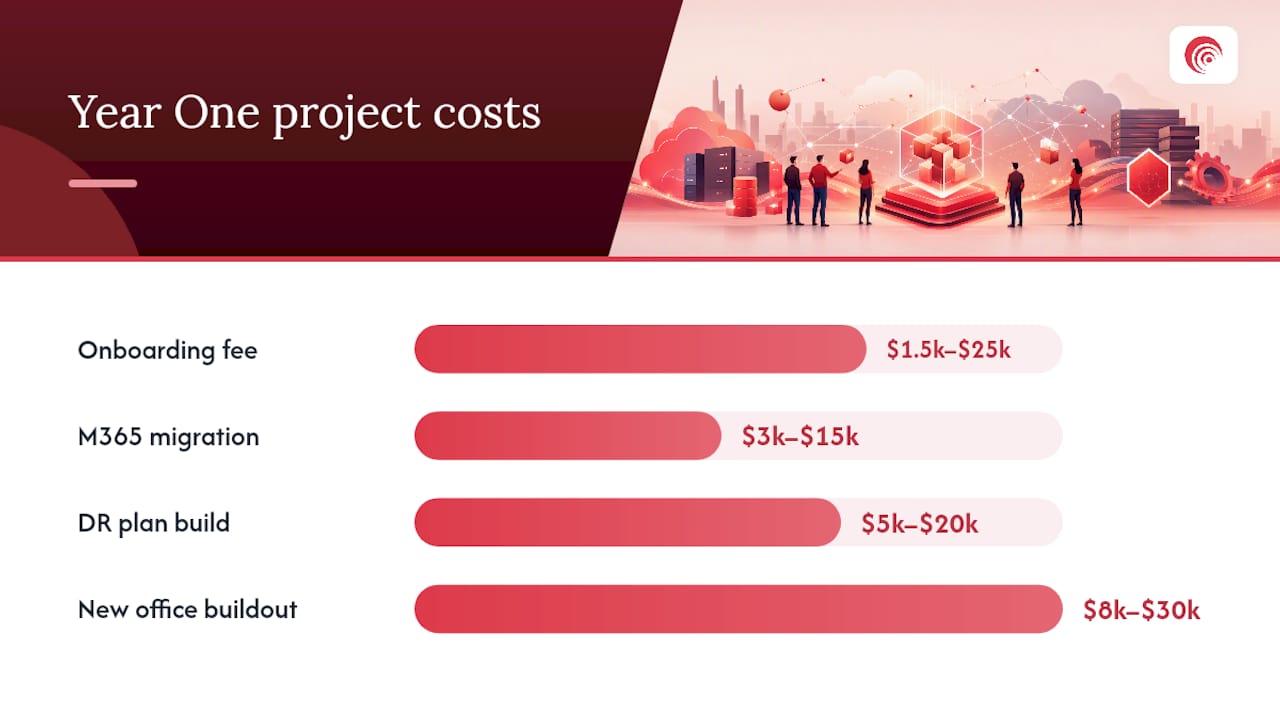
Every managed IT contract carries a first-year cost beyond the monthly fee. Onboarding typically equals one to two months of your service fee, ranging from roughly $1,500 for a simple small-office setup to $25,000 or more for a complex, multi-site environment with legacy systems to untangle.
Project work outside the standard contract gets billed hourly, commonly $165 to $285 per hour depending on the provider's market and the specialist skill required.
- Microsoft 365 tenant migration: often $3,000–$15,000 depending on mailbox count and data volume
- Disaster recovery plan build: typically $5,000–$20,000
- New office network buildout: usually $8,000–$30,000 depending on square footage and device count
Watch for hidden costs too: hardware markups on equipment the provider procures for you, and after-hours emergency support billed at a premium rate, sometimes double the standard hourly fee. Ask for onboarding fee waivers on multi-year contracts; many providers will negotiate this if you push.
How Do You Compare MSP Quotes Without Getting Burned?
Comparing two proposals with different pricing structures is where most buyers lose money, mainly because a lower number on page one often hides missing scope on page four.
- Request a line-item breakdown separating base services from add-ons like email security, compliance support, and after-hours coverage.
- Ask for the exact SLA response times by ticket severity, not vague language like "prompt support."
- Confirm backup testing frequency and request a recent restoration log, not just a description of the backup process.
- Verify whether EDR is enterprise-grade or a repackaged consumer antivirus product.
- Get the onboarding fee, timeline, and what happens if migration runs over schedule.
- Ask about multi-year discounts and whether project work can be bundled into the base contract.
Treat any quote under $80 per user per month for a supposedly "full stack" package as a red flag. That price point almost never covers real EDR, tested backups, and a staffed helpdesk simultaneously. Vague hourly rates without a stated range, and providers who can't produce a sample SLA document on request, are two more warning signs worth walking away from.
Pro Tip: Ask each provider to price the exact same scope document, written by you, not by them. Differences in the resulting quotes tell you more about hidden gaps than any sales conversation will.
Why Certifications and 24/7 Coverage Change the Value Equation
SOC 2 Type II certification means an independent auditor verified the provider's internal controls, not just claimed them. A 24/7 security operations center catches incidents at 2 a.m., when unmonitored environments sit exposed for hours.
- One accountable team eliminates the finger-pointing that happens when networking, security, and compliance sit with separate vendors.
- Continuous compliance support cuts audit prep time because evidence gets collected year-round instead of scrambled together before a deadline.
- A single point of contact means faster incident response, since no time gets lost coordinating between vendors during a breach.
Marfi's 24/7 SOC services are built around exactly this model for regulated buyers.
Where MSP Billing Surprises Most Buyers
The biggest gap I see isn't the monthly rate, it's the distance between that number and the real all-in first-year cost once onboarding, projects, and compliance work land on the invoice. Buyers who compare only the headline per-user price consistently underbudget. Tested backups and a written SLA matter more than shaving $10 off the monthly fee. Before signing anything, build a full 12-month budget that includes onboarding and any project work you already know is coming.
— Danny
How Marfi Prices Managed IT for Regulated Companies
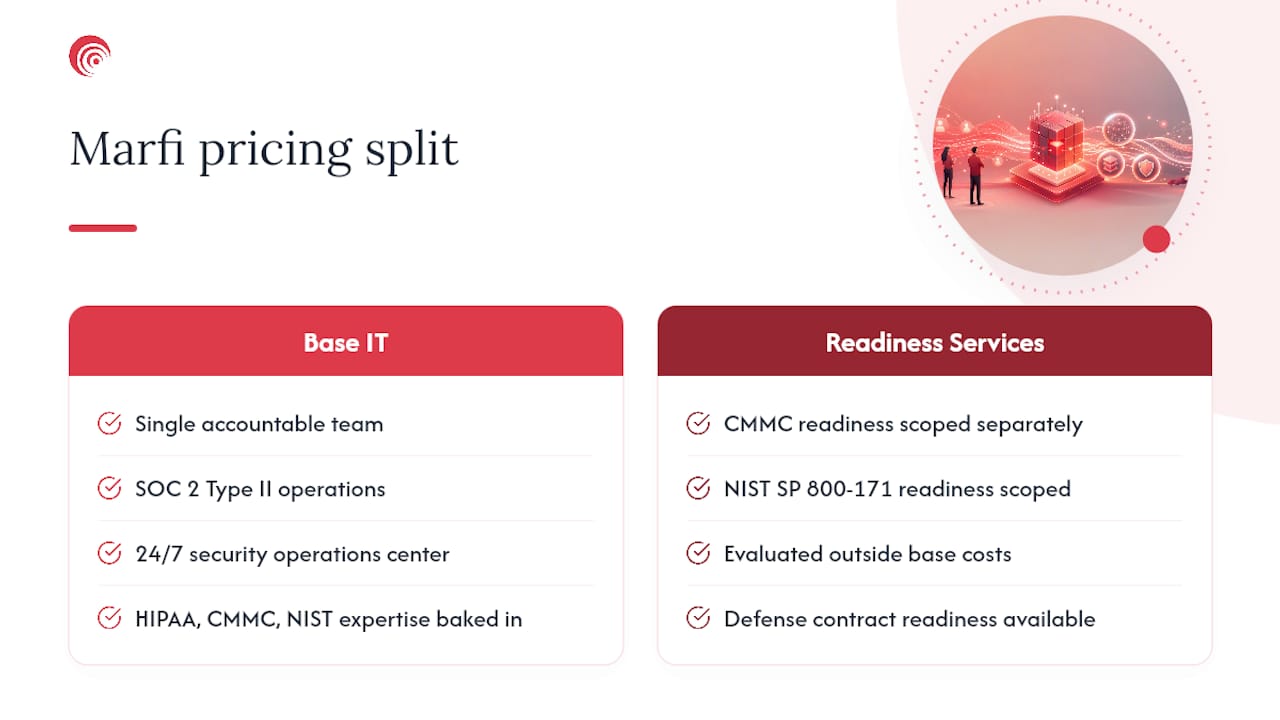
Marfi builds pricing around what regulated buyers actually need: a single accountable team handling IT, cybersecurity, and compliance instead of three vendors pointing fingers at each other during an incident. That structure includes SOC 2 Type II certified operations, a 24/7 security operations center, and compliance expertise across HIPAA, CMMC, and NIST frameworks baked into the base engagement rather than billed as a confusing patchwork of add-ons.
Onboarding follows a defined scope review before any number gets quoted, so your first-year budget reflects your actual environment, not a generic package that gets revised twice after signing. Buyers who need defense contract readiness alongside general IT management get that scoped through Marfi's CMMC and NIST SP 800-171 readiness services, evaluated separately from base managed IT costs so nothing gets buried in fine print.
If you're budgeting for next year and want a number built around your actual headcount, servers, and compliance obligations, request a scoped cost estimate from Marfi's managed IT team.
Sources
Cross-check any quote against CISA's small-business cyber guidance and the 2026 MSP pricing benchmarks from MSP Directory before building your own 12-month budget.
- CISA — Cyber guidance for small businesses
- MSP Pricing Models in 2026: Per-User vs Per-Device vs Tiered | MSP Directory
- MSP Pricing Guide 2026: What Managed IT Services Should Cost — SerenIT
- Managed IT Cost in 2026 | Think Technologies Group