

Adopt a Zero Trust aligned Pilot → Deploy → Operate program and turn on key controls including Microsoft Purview DSPM reporting, Restricted Content Discovery (RCD) on your riskiest SharePoint sites, Entra access reviews on sensitive groups, Purview DLP for Copilot in audit mode, and Copilot interaction logging forwarded to Microsoft Sentinel. This sequence is the difference between a Copilot rollout that surfaces years of accumulated oversharing to every employee and one that scales safely.
Copilot does not grant anyone new access. It works off each user's existing Microsoft Graph permissions, but it makes every stale permission and forgotten "anyone with the link" share instantly discoverable through a chat prompt. Microsoft Copilot governance is really about closing that gap between what people technically can access and what they should.
Here's the 72-hour action list:
- Run a Microsoft Purview DSPM for AI oversharing assessment across your top active SharePoint sites.
- Apply RCD or Restricted Access Control to sites flagged as high-risk before you enable Copilot more broadly.
- Kick off Entra access reviews on groups and sites holding sensitive or regulated content.
- Set Purview DLP for Copilot to audit mode to see what would be blocked before you flip the switch.
- Enable Copilot interaction logging and route it into Sentinel for correlation.
Pro Tip: Track three numbers weekly during rollout: count of high-risk sites remaining, percentage of content with sensitivity labels applied, and number of stale group memberships removed. Those three metrics tell you more about readiness than any checklist.
Key Takeaways
Copilot governance succeeds when Zero Trust identity controls, Purview data protections, and continuous DSPM monitoring operate together rather than as separate one-time projects.
| Point | Details |
|---|---|
| Copilot amplifies existing permissions | It surfaces what users already have access to, so oversharing remediation must happen before or during rollout. |
| Foundational vs optimized controls | E3 covers manual baseline protection; E5 unlocks DSPM automation, automated DLP, and Insider Risk Management. |
| RCD is temporary, not permanent | Use it to contain risk during remediation, then remove it once underlying permissions are actually fixed. |
| Logging and retention enable investigation | Forward Copilot interaction logs to Sentinel with retention that matches your regulatory and incident timelines. |
| Governance is continuous, not a launch event | Weekly DSPM scans and quarterly access reviews prevent the drift that undoes initial remediation work. |
| Marfi operationalizes the operate phase | Marfi's managed SOC and continuous GRC services run the ongoing monitoring and review cycle regulated organizations need. |
Table of Contents
- What Does Microsoft Copilot Governance Actually Require?
- How Do You Find and Fix Overshared Content Before Copilot Launch?
- How Does Purview DLP Stop Copilot From Leaking Sensitive Data?
- Which Identity Controls Actually Reduce Copilot's Reach?
- How Should You Govern Connectors and Copilot Agents?
- What Should You Log, and How Long Should You Keep It?
- What Licensing and Admin Roles Does Copilot Governance Require?
- What Does a Pilot to Deploy to Operate Rollout Look Like?
- Data Privacy: What a Copilot Privacy Impact Assessment Should Cover
- How Do You Plan Incident Response for Copilot-Specific Events?
- Who Owns Accountability for AI-Generated Content Decisions?
- How Does Copilot Governance Fit Into GDPR and HIPAA Compliance?
- How Do You Keep Governance Current as Copilot Risk Evolves?
- What Training Do Employees Actually Need for Copilot Governance?
- How Marfi Operationalizes Copilot Governance for Regulated Companies
- The Uncomfortable Truth About Most Copilot Rollouts
- Turn Copilot Governance Into a Managed, Standing Program
- Sources
What Does Microsoft Copilot Governance Actually Require?
Microsoft Copilot governance breaks into three control families, and confusing them is why most rollout plans stall. Data security governs what content Copilot can see and ground responses on. AI security governs how the model itself behaves, including prompt injection resistance and connector scope. Compliance and privacy governs whether you can prove, to an auditor or regulator, that both of the first two are working as designed.
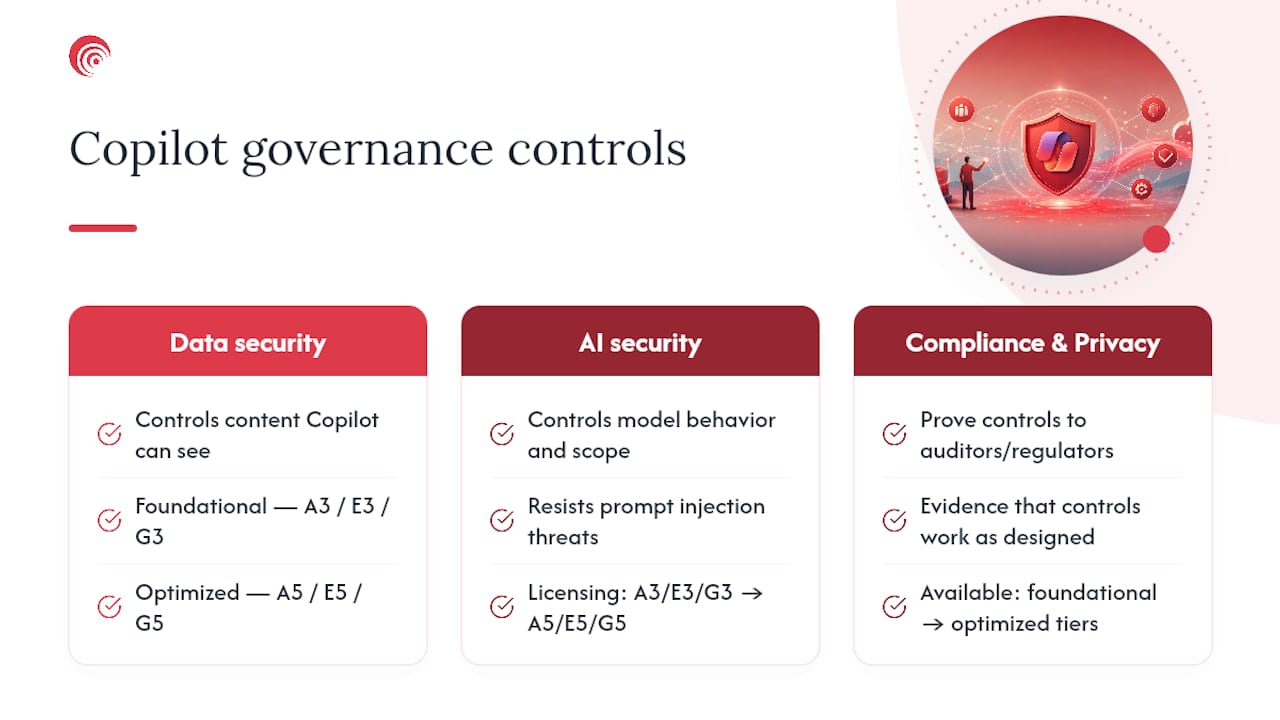
Microsoft's own Copilot Control System frames this exact structure and draws a hard line between foundational controls, available at the A3/E3/G3 tier, and optimized controls, which require A5/E5/G5. That licensing split matters more than most vendors admit up front, because it directly shapes your budget conversation before you write a single policy.
Foundational controls (E3-level)
At the E3 tier you get baseline SharePoint permission management, standard Purview sensitivity labeling, manual DLP policies, and basic Entra identity protection. This is enough to stop the worst oversharing scenarios but requires manual review cycles rather than automation. If your organization is early in its Copilot deployment or still validating use cases, E3-level controls plus disciplined manual process will get you through pilot safely.

Optimized controls (E5-level)
E5 unlocks Microsoft Purview DSPM for AI, automated DLP enforcement specific to Copilot prompts and responses, Insider Risk Management, and deeper Microsoft Defender integrations. These are the controls that scale. Manually reviewing site permissions across a 5,000-employee tenant every quarter is not a real strategy. Automated DSPM assessments running continuously are.
Here's how the specific tools map to each control category:
| Control Category | Foundational Tool (E3) | Optimized Tool (E5) |
|---|---|---|
| Data classification | Manual sensitivity labels | Purview DSPM for AI with auto-labeling |
| Data loss prevention | Basic DLP policies | Purview DLP for Copilot with audit/block modes |
| Site access management | Manual permission reviews | SharePoint Advanced Management (RCD, access reviews) |
| Identity governance | Standard Entra roles | Entra PIM with JIT elevation and Access Reviews |
| Threat detection | Basic audit logs | Sentinel SIEM correlation with Defender integration |
A copilot management framework built only on foundational tools works for a pilot of a few hundred users. It breaks down at enterprise scale, where the volume of sites, groups, and permission combinations outpaces any team's capacity for manual review.
How Do You Find and Fix Overshared Content Before Copilot Launch?
Oversharing remediation follows a predictable three-stage process: discover what's exposed, contain the blast radius while you fix it, and then permanently remediate the underlying permission structure. Skipping straight to remediation without containment is how rollouts get paused mid-flight when someone finds a sensitive HR file surfaced in a Copilot answer.
- Run discovery assessments. Start with a SharePoint Advanced Management (SAM) Content Management Assessment alongside a Purview DSPM oversharing report. SAM surfaces ownerless sites, broken inheritance, and permission misconfigurations; DSPM layers on data sensitivity context so you know which overshared sites actually contain regulated or confidential material.
- Rank your top 100 highest-risk sites. Rather than trying to fix every site in your tenant simultaneously, prioritize by a combination of active usage and sensitivity. A dormant site with sensitive data is lower priority than an active site with sensitive data and broad access.
- Contain exposure with RCD. Restricted Content Discovery limits which sites Copilot can search and ground on, without changing anyone's actual SharePoint permissions. It's a scalpel, not a fix. Microsoft's guidance recommends scoping RCD to an allow list of up to roughly 100 sites while remediation runs in the background, giving you a controlled runway instead of an all-or-nothing launch.
- Validate with DLP in audit mode. Turn on Purview DLP for Copilot in audit-only mode against your risk list. This shows you exactly what would get blocked without actually blocking anything yet, which lets you tune policies before they affect real users.
- Remediate ownership and permissions. Require site owners to complete access reviews and justify continued membership rather than defaulting to approval. Remove org-wide "Everyone except external users" grants and anonymous sharing links from any site touching regulated data.
- Fix inheritance and apply labels. Broken permission inheritance is one of the most common oversharing causes; a folder shared broadly years ago can silently override the site's current permission model. Reset inheritance where it makes sense, then apply Purview sensitivity labels and turn on auto-labeling so newly created content gets classified automatically instead of relying on users to do it manually.
- Set retention and lifecycle policies. Old content nobody uses is still content Copilot can surface. Retention and lifecycle policies that archive or delete stale data shrink your exposure surface permanently, not just for the current remediation cycle.
Pro Tip: Restricted Access Control (RAC) and RCD solve different problems. RAC actually changes who can access a site. RCD only changes what Copilot can search. Use RAC for genuine permission fixes and RCD as a temporary shield during remediation, then remove RCD once the underlying permissions are clean.
Site owners who never signed up to be governance stakeholders will resist access reviews at first. Framing it as "confirm your team still needs this" rather than "justify your access" tends to get faster completion rates, without changing the substance of the review.
How Does Purview DLP Stop Copilot From Leaking Sensitive Data?
Purview DLP for Copilot works at two points in the pipeline: what content Copilot is allowed to ground responses on, and what a user is allowed to type into a prompt. Both matter, and most governance conversations only address the first.
On the grounding side, DLP policies can exclude specific sensitivity labels from being used at all, so a document labeled "Highly Confidential" never enters a Copilot response regardless of who's asking. On the prompt side, DLP can detect and block sensitive information types, such as Social Security numbers or credit card data, being pasted directly into a Copilot chat. Running policies in audit mode first, as Microsoft's foundational deployment guidance recommends, shows you the real-world impact before you start blocking legitimate work.
Copilot also ships with built-in protections against prompt injection and harmful content generation, but those protections generate alerts your security team has to actually be watching for. Enabling the relevant Defender and Purview alert policies, and routing them somewhere a human reviews them, is the part organizations skip most often.
- Configure DLP to exclude labeled sensitive content from Copilot grounding, starting in audit mode.
- Enable prompt-level DLP detection for regulated data types specific to your industry.
- Turn on and route prompt-injection and harmful-content alerts to your security team, not just to a dashboard nobody checks.
- Review and approve third-party connector and subprocessor access on a defined cadence, not once at launch.
One detail catches teams off guard: documents under legacy Information Rights Management (IRM) protection are invisible to Copilot entirely. It's not blocked from grounding, Copilot simply can't process it. If your organization migrated from an older rights-management system, transition those documents to Purview sensitivity labels, which Copilot fully supports, or you'll get confusing gaps in Copilot answers that look like bugs but are actually a legacy protection scheme working exactly as designed for a system Microsoft has since moved past.
Which Identity Controls Actually Reduce Copilot's Reach?
The single highest-leverage move in any zero trust implementation roadmap for Copilot is shrinking the identity surface before you worry about the content surface. A user with excessive group memberships can pull sensitive data through Copilot regardless of how well you've labeled and locked down individual sites.

Start with recurring Entra access reviews on any group, SharePoint site, or Teams channel holding sensitive content. The critical design choice here: require reviewers to actively justify continued membership rather than defaulting to approval. A review that auto-approves anyone who doesn't respond isn't a review, it's a formality that generates a compliance artifact without actually reducing risk.
Privileged accounts deserve separate, tighter treatment. A compromised or careless admin account with standing Copilot access can surface far more sensitive material than a standard user account ever could, simply because admin roles tend to carry broader group memberships by design. Microsoft Entra Privileged Identity Management (PIM) addresses this by requiring just-in-time elevation with justification and automatic expiry, rather than granting standing administrative privileges around the clock.
- Configure recurring access reviews (quarterly at minimum) on all high-sensitivity groups and sites.
- Require written justification for continued access rather than one-click approval.
- Enable Entra PIM for all privileged roles with time-boxed elevation and mandatory justification.
- Apply conditional access policies that block or restrict Copilot access from unmanaged or noncompliant devices.
Pro Tip: Separate your admin identities from your daily-use identities entirely. An IT admin who checks email and uses Copilot from the same account that holds Global Administrator rights is a single phishing click away from a much bigger incident than a standard user compromise.
Device compliance status should factor into your conditional access policy for Copilot the same way it does for any other sensitive Microsoft 365 workload. An unmanaged personal laptop accessing Copilot with full corporate permissions is a gap most organizations close for email and files but forget to close for Copilot specifically.
How Should You Govern Connectors and Copilot Agents?
Every Graph connector and Copilot agent you enable expands what Copilot can query, often reaching into systems whose access models were never designed with a conversational AI interface in mind. A CRM connector might expose customer financial data to any employee who can phrase the right prompt, even if that employee never had direct CRM access before.
- Inventory what's already connected. Before approving anything new, document every existing Graph connector and agent, what system it reaches, and what data classes it can surface. Most organizations are surprised by what's already enabled.
- Approve by policy, not by request. Set a formal approval workflow for new connectors that requires documenting the data access pattern and business justification, rather than approving ad hoc requests from individual teams.
- Stage in a scoped pilot group first. Enable new connectors for a small pilot population before broad rollout, the same Pilot → Deploy → Operate discipline you'd apply to Copilot itself.
- Apply connector-specific DLP and scope limits. Where a connector reaches into HR or financial systems, apply the same DLP rigor you'd apply to SharePoint content, and limit the scope of what the connector can return.
- Document third-party responsibilities in writing. Because connector access models frequently don't align with Microsoft 365's native permission structure, get the contractual and privacy responsibilities of any third-party system spelled out before go-live, not after an incident.
If your teams build or test custom agents, staging them through a controlled developer environment before production exposure catches issues early. Tools built for agent framework testing can help validate connector behavior and data access patterns in a sandbox before anything touches production data.
What Should You Log, and How Long Should You Keep It?
Copilot interaction logging is not optional if you plan to investigate anything after the fact. Enable it at the tenant level, forward everything to Purview Audit, and correlate it with your broader security telemetry through Microsoft Sentinel. Without this, a security team has no evidence trail when someone asks "what did Copilot surface to this user last Tuesday," and that question comes up more often than most teams expect once Copilot is broadly deployed.
Visibility into Copilot activity is essential for detection and response; disabling logging or setting an aggressively short retention window leaves your organization with no usable evidence when an incident actually happens. Retention needs to be long enough to cover both your regulatory obligations and the realistic timeline of a typical investigation, which often stretches months past the original event before anyone notices something was wrong.
- Enable Copilot interaction logging tenant-wide before broad rollout, not after.
- Forward Purview audit logs into Sentinel for correlation with identity, endpoint, and network telemetry.
- Set retention that matches your industry's compliance requirements, not the platform default.
- Build detection rules for anomalous Copilot query volume, unusual data types being requested, or activity from privileged accounts outside normal patterns.
A SOC that already runs Sentinel dashboards for identity and endpoint events can add Copilot-specific detection rules without standing up new infrastructure. The real work is defining what "anomalous" looks like for your organization specifically, a marketing employee suddenly querying payroll data through Copilot is a very different signal than a finance employee doing the same thing.
What Licensing and Admin Roles Does Copilot Governance Require?
Budgeting for Microsoft copilot compliance work starts with knowing exactly which SKU unlocks which control, because the gap between E3 and E5 is bigger than most procurement conversations account for.
- E3 baseline covers manual sensitivity labeling, standard DLP policies, basic Entra role management, and standard audit logs, enough for a controlled pilot.
- E5 optimized adds Purview DSPM for AI, automated DLP enforcement for Copilot prompts and responses, Insider Risk Management, and deeper Defender XDR integration, the automation layer that makes governance sustainable at scale.
- Required admin roles include a Compliance Administrator for Purview policies, a SharePoint Administrator for SAM and site remediation, a Privileged Role Administrator for PIM configuration, and a Security Administrator for Sentinel and Defender integration.
- Minimal privilege plan: assign these roles individually rather than bundling them into Global Administrator, and put every one of them under PIM's just-in-time elevation model.
If budget is tight, prioritize Purview DSPM for AI first. It's the single control that turns oversharing discovery from a manual quarterly project into a running assessment, and it pays for itself the first time it catches a misconfigured site before Copilot surfaces it to the wrong person.
What Does a Pilot to Deploy to Operate Rollout Look Like?
A phased rollout beats a big-bang launch every time, because it gives you a controlled population to catch problems in before they reach your entire organization. Here's the practical breakdown by phase.
- Pilot. Scope Copilot to a limited user group. Enable RCD on an allow list of your cleanest, lowest-risk sites. Run Purview DLP in audit mode to see impact without enforcement. Establish your DSPM baseline assessment. Success looks like: zero unexpected sensitive-data surfacing incidents and a documented list of remediation priorities for the rest of the tenant.
- Deploy. Expand to broader user populations only after remediation KPIs from pilot are met, meaning your top-priority high-risk sites are cleaned up. Gate the rollout on completed access reviews for sensitive groups. Run user training alongside the expansion. Decommission RCD on sites once their underlying permissions are actually fixed, rather than leaving it as a permanent crutch.
- Operate. Shift from project mode to continuous operations: automated sensitivity auto-labeling, lifecycle policies retiring stale content automatically, quarterly recurring access reviews as standing process, and SOC playbooks specifically written for Copilot-related alerts. This phase never really ends; it's the ongoing state your organization lives in.
| Phase | Primary Owner | Success Metric |
|---|---|---|
| Pilot | IT security lead | Zero unexpected exposure incidents; risk site list documented |
| Deploy | IT operations + compliance | Remediation KPIs met before scale; RCD removed from fixed sites |
| Operate | SOC + compliance | Quarterly reviews completed; automated labeling coverage tracked |
The organizations that struggle here almost always tried to skip straight from pilot to full deployment without hitting the remediation gates in between. The gates exist because they catch real problems, not because Microsoft's documentation demands ceremony for its own sake.
Data Privacy: What a Copilot Privacy Impact Assessment Should Cover
A privacy impact assessment for Copilot needs to answer one core question: what personal or regulated data can this deployment expose, to whom, and under what circumstances. That's a different exercise than a general data security review, because Copilot's conversational interface means data can surface in contexts nobody anticipated when the original access grant was made.
Start the assessment by mapping data flows: what personal data exists across SharePoint, OneDrive, Teams, and any connected systems, and which of those sources Copilot can currently ground on. Cross-reference that map against your sensitivity labeling coverage. Gaps between "data that exists" and "data that's labeled" are exactly where privacy exposure hides.
Data minimization matters more with Copilot than with static file storage, because a well-phrased prompt can synthesize scattered personal data points into a single response that reveals more than any individual document would on its own. Someone might never open five separate files about an employee, but Copilot summarizing all five in one answer creates a privacy exposure that didn't functionally exist before.
Practical minimization steps include scoping connector data returns to only necessary fields, applying retention policies aggressively to personal data that's outgrown its business purpose, and restricting Copilot's grounding scope for HR, health, and financial data categories through DLP exclusions rather than relying on general access controls alone. Document the assessment itself; regulators increasingly expect to see that organizations deliberately assessed AI-specific privacy risk, not just adapted an existing DPIA template without considering what changed.
How Do You Plan Incident Response for Copilot-Specific Events?
Copilot introduces incident types your existing IR playbooks probably don't cover. A traditional data breach playbook assumes an attacker exfiltrated files. A Copilot incident might involve no exfiltration at all, just an authorized user asking a prompt that surfaces data they technically had access to but never should have seen in practice.
Build a Copilot-specific incident category into your existing IR plan rather than creating an entirely separate process. Define trigger conditions clearly: unusual query volume from a single account, prompts requesting unusually sensitive data categories, or Copilot responses that include content later flagged as mislabeled or overshared. Each trigger needs a defined severity tier and response owner.
Your investigation workflow depends entirely on the logging and retention decisions covered earlier. Without Copilot interaction logs forwarded to Sentinel, your incident responders are reconstructing events from fragments. With proper logging, they can pull the exact prompt, the exact grounding sources, and the exact response, then determine whether the exposure was a policy gap, a labeling failure, or user misuse.
Containment actions specific to Copilot include immediately restricting the affected user's group memberships, applying emergency RCD to the source site while you investigate, and rotating any credentials if the incident involved a compromised account. Post-incident, feed findings back into your DLP and labeling policies. A Copilot exposure incident is almost always evidence of an underlying oversharing or classification gap that existed before Copilot ever made it visible, and fixing that root cause prevents the next incident rather than just the next Copilot-specific one.
Who Owns Accountability for AI-Generated Content Decisions?
Governance policies for Copilot need to draw a clear line between what Copilot generates and who is accountable for acting on it. This distinction gets murky fast without an explicit written policy, because employees naturally start treating Copilot output with more authority than a first draft deserves.
Establish a policy that Copilot-generated content, whether it's a summary, an analysis, or a drafted communication, requires human review before it's used for any decision with real consequences: financial reporting, HR actions, customer communications, or compliance filings. The person who acts on Copilot's output owns the outcome, not the tool. That sounds obvious written down, but without an explicit policy, accountability tends to diffuse into nobody in practice.
Require disclosure when AI-generated content is used in specific high-stakes contexts, such as customer-facing communications or regulatory submissions. This isn't about transparency theater; it's about making sure a reviewer downstream knows to apply extra scrutiny to a document that started as an AI draft rather than assuming it was written and vetted by a human from the start.
Build a lightweight review checkpoint into workflows where Copilot output feeds into decisions, rather than trying to police every single interaction. A blanket "review everything" policy gets ignored within weeks. A targeted policy that flags specific high-risk content categories, financial figures, legal language, personal data summaries, for mandatory review gets followed because it's actually proportionate to the real risk.
How Does Copilot Governance Fit Into GDPR and HIPAA Compliance?
Copilot governance doesn't replace your existing compliance framework; it needs to plug into it. Organizations already managing GDPR or HIPAA obligations should treat Copilot as a new processing activity that has to satisfy the same requirements as any other system touching regulated data, not as a separate parallel compliance track.
For GDPR-relevant organizations, that means mapping Copilot's data grounding activity against your existing lawful basis documentation and data processing records. If Copilot can surface personal data in responses, that's a processing activity that needs to appear in your Article 30 records, and your DLP exclusions for personal data categories need to align with whatever lawful basis you're actually relying on for that data's original collection.
For HIPAA-covered entities, protected health information needs to be excluded from Copilot grounding by default unless there's a specific, documented, permitted use case, enforced through Purview DLP labeling rather than trust in general access controls. Business associate agreements covering any connected third-party systems need explicit language addressing AI processing, since most older BAAs were written before conversational AI tools existed and may not clearly cover this use case.
The practical integration point is your existing compliance framework's control mapping. Whatever framework you're already running, whether that's a HIPAA security risk assessment or a GDPR data protection impact process, Copilot-specific controls should slot into existing control families rather than spawning a duplicate compliance program. Purview's compliance manager assessments can map directly against many of these regulatory control sets, giving you a single source of truth instead of parallel tracking spreadsheets that inevitably drift out of sync with each other.
How Do You Keep Governance Current as Copilot Risk Evolves?
Copilot governance strategies fail most often not at launch but eighteen months later, when the initial remediation work has faded from institutional memory and new sites, connectors, and permission grants have quietly reintroduced the same oversharing problems you fixed at deployment. Treating governance as a one-time project rather than continuous operations is the single most common long-term failure mode.
Continuous DSPM assessment, run weekly rather than quarterly, catches drift before it compounds. New SharePoint sites get created daily in any active organization, and without automated scanning, each one starts as an unlabeled, unreviewed blind spot that Copilot can potentially surface. Automation is what closes this gap; manual quarterly reviews simply can't keep pace with the rate of new content creation in a growing organization.
Build a recurring cadence into your operations: monthly automated DSPM scans, quarterly access reviews on sensitive groups, and an annual full policy review that reassesses whether your DLP rules and labeling taxonomy still match how the organization actually uses Copilot. New connectors and agents need to enter this same cycle rather than being approved once and forgotten.
Assign clear ownership for this ongoing process. Governance that belongs to "IT" in general tends to belong to nobody specifically, and specifically nobody notices when a monitoring dashboard goes unreviewed for three months. A named owner with a defined review cadence, backed by SOC alerting for anomalies between reviews, keeps the program alive instead of decaying into a compliance artifact nobody actually maintains.
What Training Do Employees Actually Need for Copilot Governance?
Generic AI awareness training misses what actually matters for Microsoft Copilot governance specifically: employees need to understand that Copilot surfaces what they already have access to, not some sanitized subset of it. That single fact reframes how people should think about sharing files and managing permissions day to day.
Effective training covers three practical areas. First, how sharing decisions today affect what Copilot can surface tomorrow, since a file shared broadly "just in case" months ago becomes instantly and effortlessly discoverable through a chat prompt rather than requiring someone to actually go hunting for it. Second, what to do when Copilot surfaces something that looks wrong, mislabeled, overly sensitive, or clearly meant for a smaller audience, with a clear reporting path rather than just ignoring it. Third, how to phrase prompts responsibly, since asking Copilot to "summarize everything about this employee" is a materially different request than asking for a specific project update, even when the underlying access permissions are identical.
Site owners and content creators need a different, more technical training track focused on sensitivity labeling and permission hygiene, since they're the ones actually creating the oversharing risk that training for end users can only partially mitigate. Make labeling training mandatory for anyone with site-owner permissions, not optional.
Refresh training when you make major policy changes, not on a fixed annual calendar that ignores what's actually happening in your rollout. A DLP policy change or new connector approval is exactly the moment employees need updated guidance, not twelve months later at the next scheduled cycle.
How Marfi Operationalizes Copilot Governance for Regulated Companies
Every control covered here, from DSPM assessments to access reviews to Sentinel correlation, requires ongoing execution, not a one-time project. Marfi runs this as a managed function: a 24/7 security operations center, SOC 2 Type II verified processes, and hands-on readiness support for FedRAMP, CMMC, and NIST frameworks, so your Copilot governance program stays operational instead of stalling out after the initial rollout.
Regulated organizations rarely lack the Microsoft licenses to secure Copilot. They lack the dedicated hours to run DSPM assessments weekly, chase down access review completions, and correlate Sentinel alerts every single day without that work competing against every other IT priority on the list.
Typical Marfi engagements start with a Purview DSPM oversharing assessment and a SharePoint remediation plan, move into executing Entra access reviews and PIM configuration, and then integrate Sentinel for continuous SOC monitoring, with the ongoing operate phase handled as a standing service rather than a project that ends.
| Approach | Internal team, DIY | Managed with Marfi |
|---|---|---|
| Continuous DSPM monitoring | Requires dedicated staff time | Included as standing service |
| SOC coverage | Business hours typically | 24/7 SOC |
| Compliance evidence | Manually assembled | Continuously maintained |
Pro Tip: When evaluating any managed partner for Copilot governance, ask specifically how they handle the "operate" phase, not just the initial assessment. A one-time DSPM report is easy to sell. Weekly monitoring and quarterly access review execution is where the real value, and the real work, actually lives.
The Uncomfortable Truth About Most Copilot Rollouts
Most Copilot governance advice treats oversharing remediation as a checkbox you complete once before launch. That's backwards, and it's the biggest gap between conventional guidance and what the actual mechanics of Copilot demand. Oversharing isn't a state you fix; it's a rate of accumulation you have to continuously outpace, because new sites, new shares, and new connectors get created every single day regardless of how clean your tenant looked on launch day.
The second thing conventional advice underplays: licensing tier matters far more than most rollout plans admit before the budget conversation happens. An organization that commits to E3-only Copilot governance is choosing manual review cycles indefinitely, and manual review cycles lose the race against content growth within a year, sometimes faster in organizations with active SharePoint use.
What should actually come first isn't training or policy documents, it's the DSPM oversharing assessment. Everything else, your DLP tuning, your access review priorities, your RCD scoping, depends on knowing where the real exposure sits before you spend a single hour writing policy. Skip that step and every subsequent decision is a guess dressed up as strategy.
— Danny
Turn Copilot Governance Into a Managed, Standing Program
Reading this playbook is the easy part. Running the DSPM assessments every week, chasing down access review completions, tuning DLP policies, and staffing a SOC that actually watches Copilot-specific alerts around the clock is where most internal teams run out of bandwidth. Marfi exists for regulated organizations that want a single accountable team handling this instead of stitching together five different vendor relationships for identity, data protection, monitoring, and compliance evidence.
Marfi's secure AI governance and automation services cover the exact controls this article walks through: Purview DSPM configuration, SharePoint remediation, Entra access review execution, and Sentinel integration, run as a continuous operation backed by a 24/7 SOC rather than a one-time consulting engagement. If your organization also needs to demonstrate CMMC, NIST, or FedRAMP readiness alongside Copilot governance, Marfi's compliance readiness services fold directly into the same engagement.
Start with a scoped Copilot governance assessment: request a consultation to get a DSPM baseline and a prioritized remediation plan before your next Copilot expansion.
Sources
- Copilot Control System security and governance | Microsoft Learn
- Limiting Microsoft 365 Copilot data exposure risk with Zero Trust apps and data controls | Microsoft Community Hub